
How to Deactivate Instagram and Keep the Option to Return
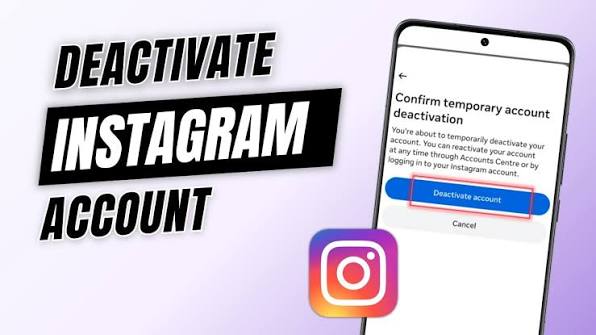
To deactivate Instagram, open Accounts Center, select the correct profile, and choose temporary deactivation in the account ownership controls. Deactivation differs from permanent deletion, logging out, and uninstalling the app. Save important information and confirm your sign-in access before taking a break. Interface labels can change, so read the actual confirmation screen and use Instagram’s official help if the layout differs.
Choose the Right Action
Decide whether you want a temporary break or permanent closure. Deactivation is the reversible account-hiding option, subject to platform rules.
The first useful distinction is between temporary deactivation and permanent deletion. Keeping those separate makes the choice clearer. Similar menus can have very different consequences. The practical aim here is the action matching your intention, rather than rushing through an action without knowing what it should accomplish.
A common problem is choosing deletion accidentally. Read the wording before confirming. Before moving on, check temporary deactivation selected. That check gives you a concrete result to use, so you do not have to decide from an impression alone.
Verify the Profile
Check the username, especially when managing several accounts. Accounts Center may list connected profiles.
Think of the exact account as a specific part of the task. It should not be confused with a familiar picture. Similar branding can conceal a wrong selection. In practice, the intended profile gives this step a clear purpose and helps you judge whether the approach suits your situation.
If you notice deactivating a business account unintentionally, pause at this point. Compare the full username at selection. Look for the correct profile name before treating the step as complete. The small details matter because a later action cannot always make up for an earlier misunderstanding.
Check Recovery Access
Confirm the password and access to the associated email or phone. Preserve any needed authentication recovery details.
It helps to decide what future sign-in access should achieve before considering current logged-in access. Being signed in today does not ensure recovery later. The intended outcome is a reliable return route. Keep that outcome in view when choosing among methods, because a method that looks convenient can still miss the actual purpose.
Watch for losing access during the break. Update recovery information first. A useful check is credentials and recovery channels available. Make the decision from what you can verify, and avoid treating a familiar-looking result as proof that every important detail is correct.
Preserve Important Material
Save important originals and consider an account information export. Inspect downloaded files rather than assuming an export completed.
There is a practical reason to give your own records its own attention instead of folding it into the platform interface. A break should not leave essential work inaccessible. The goal is usable copies. Approaching it as a separate decision helps you keep the instructions clear and prevents unrelated details from distracting you.
One avoidable difficulty is an unopened or missing archive. Check the files you actually need. Confirm important content available outside the account. If that confirmation is missing, use the relevant guidance for this step instead of assuming that the rest of the process will compensate.
Open Accounts Center
Go through Instagram’s profile settings and locate Accounts Center. Use the official app or website.
At this stage, official controls matters more than third-party closure services. Account actions require trusted access. You are aiming for a legitimate settings route. A clear target makes it easier to choose a sensible next action and to recognize when the current approach does not fit what you need.
Be careful about entering credentials into an unfamiliar site. Navigate through Instagram itself. Pay attention to the official account interface. This is the detail that makes the advice usable in a real situation, where conditions may differ from the simplest example.
Find Ownership Controls
Look under Personal details and Account ownership and control for Deactivation or deletion, using current labels.
Treat the correct settings area as a decision you can explain, rather than letting button location in an old screenshot make the decision for you. Layouts vary across versions and accounts. The purpose is the account-management menu. That reasoning is useful when you encounter a variation and need to understand which part of the advice still applies.
Do not overlook searching only for an exact icon. Use settings search or official help. Check the relevant control for the chosen profile. Keeping that point explicit makes the result easier to assess and reduces the chance of continuing simply because you have already invested time in the approach.
Choose Deactivate and Read Prompts
Select Deactivate account and follow authentication and confirmation prompts. Read timing and return instructions.
The connection between confirmation details and clicking through quickly deserves a closer look. Platform conditions can change. What matters most is an understood temporary action. Use that relationship to choose the appropriate method instead of relying on a rule remembered without its original conditions.
A sign to reconsider the approach is missing a warning or restriction. Pause to read the actual screen. Look specifically for the stated result and return conditions. A focused observation is more useful than a broad judgment that something seems right or wrong.
Plan Contact Alternatives
Tell essential contacts how to reach you when appropriate. Businesses need a plan for open enquiries or support.
Give priority to continued communication when unexpected silence would distract from the immediate task. A hidden account may interrupt an existing contact channel. The desired result is a practical contact route. Keeping the scope narrow here lets you deal with the relevant issue without adding changes that have no clear purpose.
A frequent source of confusion is customers left without help. Resolve active matters and update relevant links. Verify important contacts have another method. That verification should match the actual situation, not just the appearance of a picture or an example with different conditions.
Avoid Accidental Reactivation
Understand the current reactivation behavior before signing in casually. Removing the app can reduce the habit of opening it.
Consider the effect of the break’s boundaries on the result, compared with uninstalling as account action. App removal alone does not deactivate a profile. Your aim is an intentional break. This is a useful point to distinguish a necessary action from an optional preference, particularly when several possible approaches seem equally convenient.
Take account of logging back in without considering consequences. Read the platform’s return guidance. The detail to confirm is what sign-in does to deactivation. If you need further help, describe that detail precisely so another person can understand the problem without guessing.
Return Deliberately
Use official sign-in and follow any identity checks. Review privacy, follows, and notifications when returning.
Finally, connect a considered return with restoring every old habit in a way that serves the original purpose. Your reasons for a break may still matter. The outcome you want is a manageable new routine. A good finish checks the result as carefully as the beginning checked the setup.
The issue to avoid is resuming unwanted notifications immediately. Adjust settings to your current priorities. Before considering the task finished, confirm the account and routine fit your needs. That final check helps separate a completed action from a result that is actually suitable for use.
A Practical Example
A creator taking a study break first saves original media and checks recovery access. They select the personal profile in Accounts Center and confirm temporary deactivation, not deletion. Essential collaborators receive an alternative contact method. When returning, the creator reviews notifications instead of automatically recreating the same distracting routine.
Before You Take an Account Break
Decide what you want the break to accomplish. If the problem is notifications, you may prefer changing notification settings. If you want your profile temporarily hidden, deactivation is the relevant account control. If you want permanent removal, deletion is a separate decision with its own confirmation and timing. Writing the intended outcome down before opening Accounts Center helps prevent a hurried tap on the wrong option.
Check how you normally sign in. You may need access to your password, authentication method, or recovery email when you return. If you manage several personal and business accounts, identify the exact Instagram profile in the account selection screen. Connected accounts may appear together, so do not assume the first profile shown is the one you intend to hide. If other people rely on an account for work, deal with authorized access and operational needs before deactivating it.
Consider saving a copy of content or records you want to retain before making the change. Deactivation should not be treated as a backup system. Once you finish, avoid signing back in casually just to check the outcome, because logging in can reactivate the profile. A separately viewed public profile may show a different state from the signed-in management screen, and platform changes can take time. Keep the confirmation information and note which account you changed. If you decide to return, use the ordinary sign-in process and follow any security checks rather than paying an unofficial service to restore access.
Related Reading
For general account management, read Little Lioness’s basic technology tips. A planned break is easier when recovery information remains current.
Frequently Asked Questions
Does uninstalling deactivate the account?
No. Removing the app does not perform the account action. Use the official temporary deactivation controls.
Will deactivation erase every copy?
No. Other people may retain messages, screenshots, or downloaded content. Do not treat hiding a profile as complete removal of previously shared information.
Can I return whenever I want?
Follow the current platform conditions and sign-in guidance. Do not rely on a fixed restriction or deadline from an outdated tutorial.
Put the Guide Into Practice
A temporary Instagram break is easier when account identity, recovery access, and the selected action are clear. Complete the deactivation flow for the intended profile and retain useful confirmation details. When you return, follow the normal sign-in and security process without relying on unofficial recovery services.